
Over a year ago, customers started asking for something we didn't think would be difficult. We certainly didn't think it would take more than a year. The longer we worked the problem, the more impossible it felt.
AuditionAI should generate PowerPoint decks as good as one made by an experienced professional.
We made real progress early. Our biggest win was allowing users to upload a template, which gave us consistent, repeatable output. That solved the "we need a deck that matches our brand" problem.
Our early templates approach produced genuinely good work — well-structured, branded correctly, internally coherent. But good and human-level creative are not the same thing.
Why weren't we satisfied?
It didn't solve creativity.
It didn't solve iterative design improvement.
And it definitely didn't solve taste.
We poured over a thousand hours into the problem.
The Deceptive Simplicity of PPTX
At first glance, PowerPoint seems simple. A PPTX file is just XML. Any LLM can generate XML.
But that's not where the real challenge is.
PowerPoint is unforgiving in ways web development is not. There are no scroll bars. Everything has to fit. And in slides, the text is part of the design.
Layout is fixed. There is no vertical overflow to catch your mistakes. A word too many and the whole slide breaks. A font size up and columns collide. Every pixel carries weight.
That realization led us to what felt like a genius plan a year ago: have the AI create the deck, render the deck into screenshots, feed those screenshots into a review loop so the AI can see what actually happened and improve it.
Simple, right?
Not even a little.
The Constraint That Changed Everything
Lab tests looked promising. But because our platform runs in our customers' cloud environments, we don't fully control the runtime. That made the rendering and review loop much harder than it looked on paper.
We studied how every major AI platform handled PPTX generation. A year ago, most of the results from almost every App we tried underwhelmed. This failure to impress was so widespread we became convinced that if we could solve this well, it would be a real differentiator.
Our Non-Negotiable Rule
Everything must run in the customer's cloud.
At one point, in a moment of weakness, I seriously considered generating everything in Google Slides and exporting to PPTX. The Google Slides API is far more AI friendly. It worked. But it would have violated our core principle — and the trust customers place in us.
From Our AI Timeline
Oct 2024 — Anthropic Computer Use: Agents Operate Full Desktops
When Anthropic's Claude gained the ability to move a mouse, type, and navigate GUI applications autonomously, it proved something we already knew: to do serious document work, AI needs to actively operate real software — not just generate text and hope. That milestone validated our architecture.
When Claude Shipped Our Idea First
We kept an eye on the rest of the market. Then one day we noticed Claude had made a major leap in PowerPoint quality.
A quick review made it clear: they were doing almost exactly what we had envisioned.
I can't overstate how frustrating it is to watch someone else ship your idea before you do. It's also a reminder that many of us are converging on the same "next obvious thing."
That observation also confirmed we were on the right path. The difference was that we couldn't simply copy the approach — we had to make it work inside arbitrary customer cloud (or on prem) environments.
What Finally Cracked It: The Four-Layer Toolchain
What ultimately cracked it was noticing the newer toolchain behind Claude's improvement. Understanding the pattern and the opensource libraries they choose inspired us to double down efforts and reach a worthy conclusion.
Proof of Parity
The Insight That Changed How We Think About Latency
There was one unexpected discovery that reframed our thinking on the entire feature:
People are willing to wait a surprisingly long time for a truly great first draft of a PowerPoint deck.
We had optimized for speed. The right optimization was quality.
A thirty-second wait feels frustrating when the output is mediocre. The same thirty seconds feels like magic when the result lands exactly right.
Document Forge: The Bigger Picture
At the same time, our team had been working on a broader architectural shift inside AuditionAI that expands on our platform's ability to safely write and execute code. We wanted something much more powerful. Stay tuned in a week or two for an update on this exciting development!
The Document Forge Iterative Improvement Loop
The Document Forge Architecture
We called this a primary quest internally — because it doesn't just solve PowerPoint. It unlocks a whole category of future capabilities we've been waiting to build.
The Saturday Call
We were only weeks away from finishing when I got a Saturday call from an executive at a new customer. He was kind, but direct:
The Call That Moved Us Faster
"Claude makes better PowerPoint decks. I think you really need these basic things to work as well in AuditionAI as they do in Claude. How can I trust you with my enterprise data when you can't even make a beautiful PowerPoint deck?"
Fair. Also — deeply frustrating.
Because making a beautiful PowerPoint deck is almost nothing like securely connecting to enterprise systems and governing enterprise data — which is our actual focus, all the time.
But I also understood the point. Presentation quality shapes trust. If the first thing someone sees isn't excellent, they question everything else.
My response:
"We're a week or two away from an upgrade that brings AuditionAI to parity with Claude on PowerPoint."
Internal Reveal
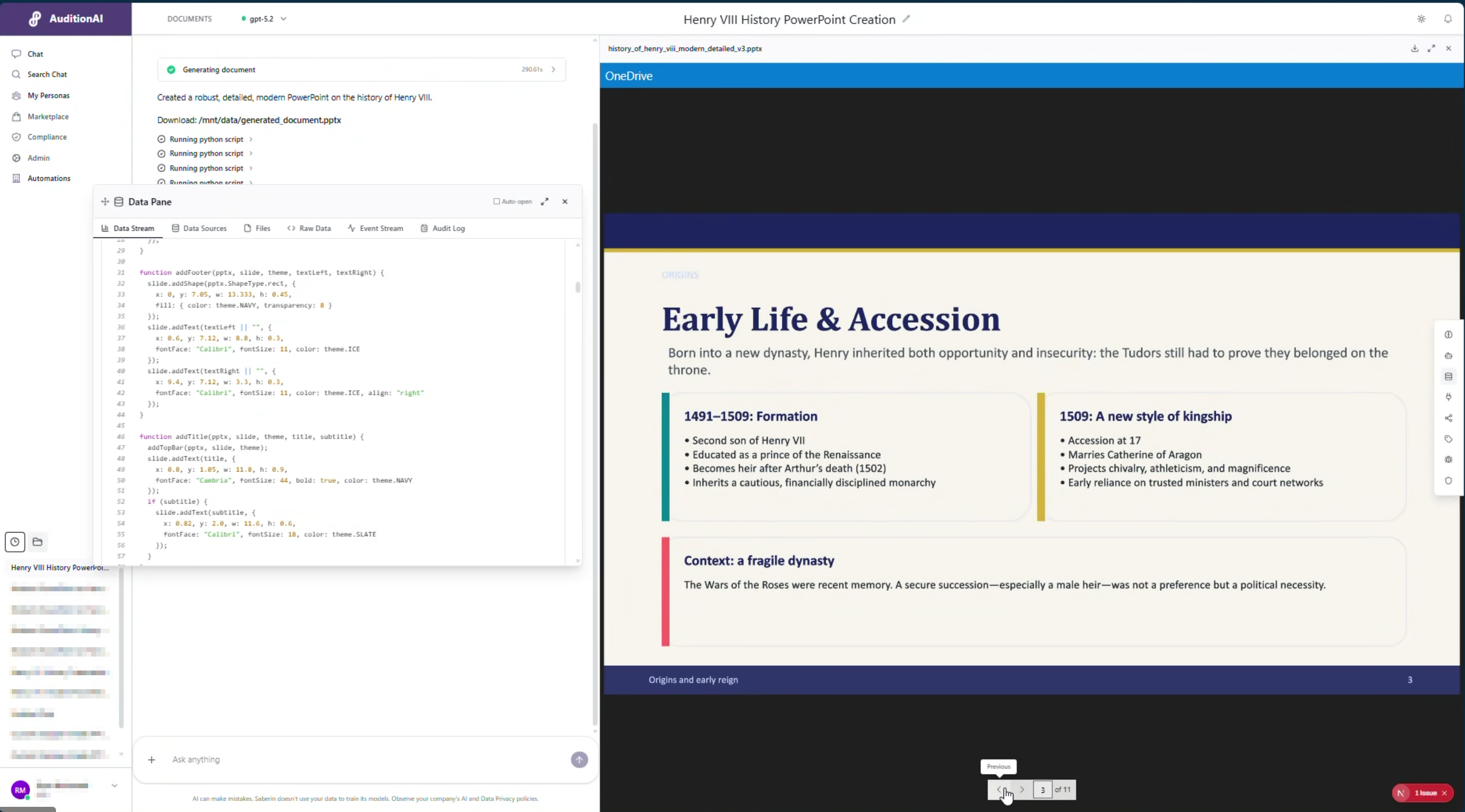
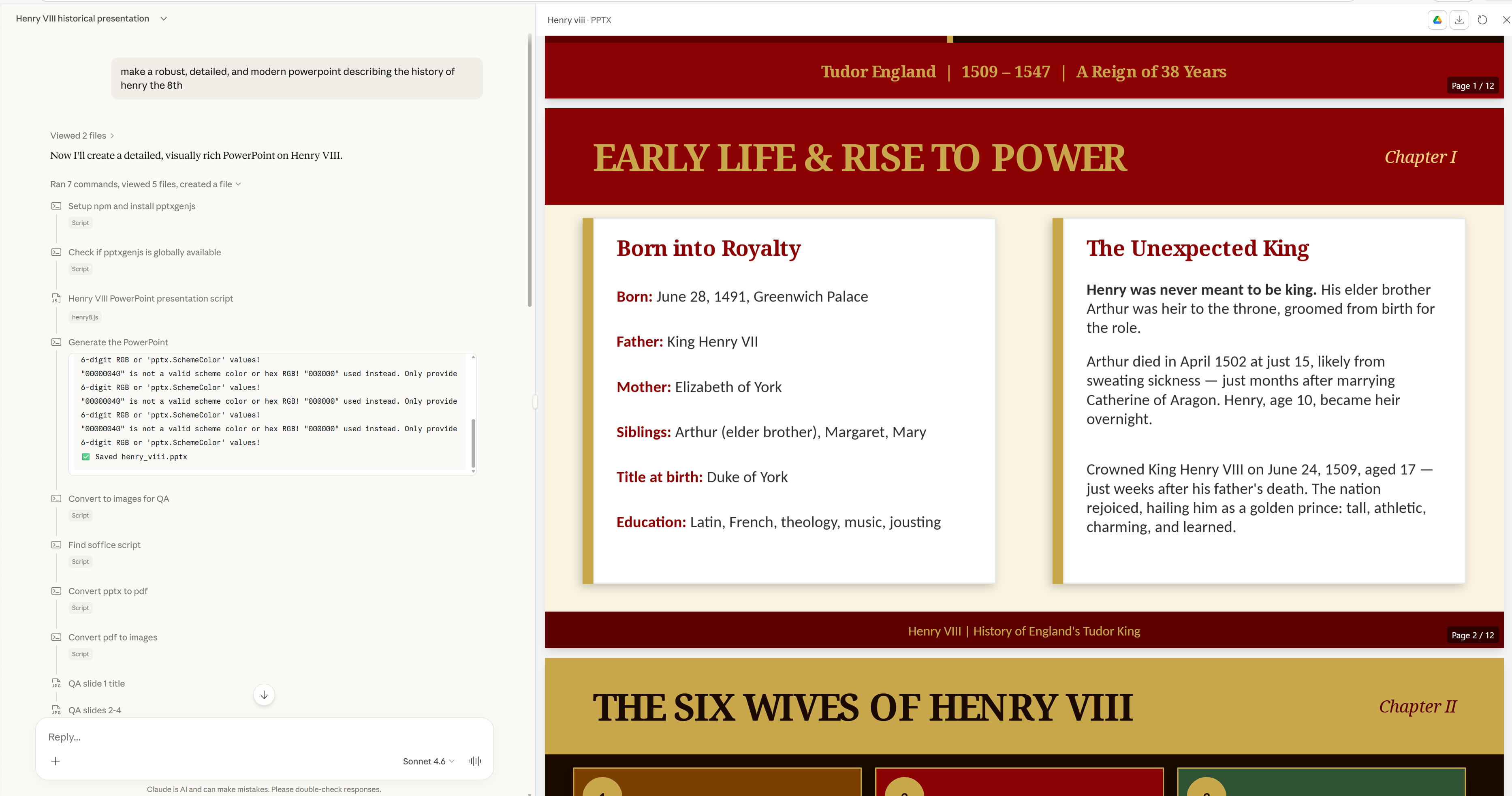
Just days ago, the team ran a live internal showcase using the same prompt in Claude and AuditionAI.
In my humble — and hopefully objective — opinion: the results are now aligned.
AuditionAI Outcome
Document Forge generating a robust, detailed PowerPoint presentation end-to-end inside AuditionAI's platform.
What the QA Loop Actually Does
The magic of Document Forge isn't just that it generates decks. It's that it sees what it generated and improves it. Here are real examples from the development process: first drafts on the left, AI-corrected versions on the right.
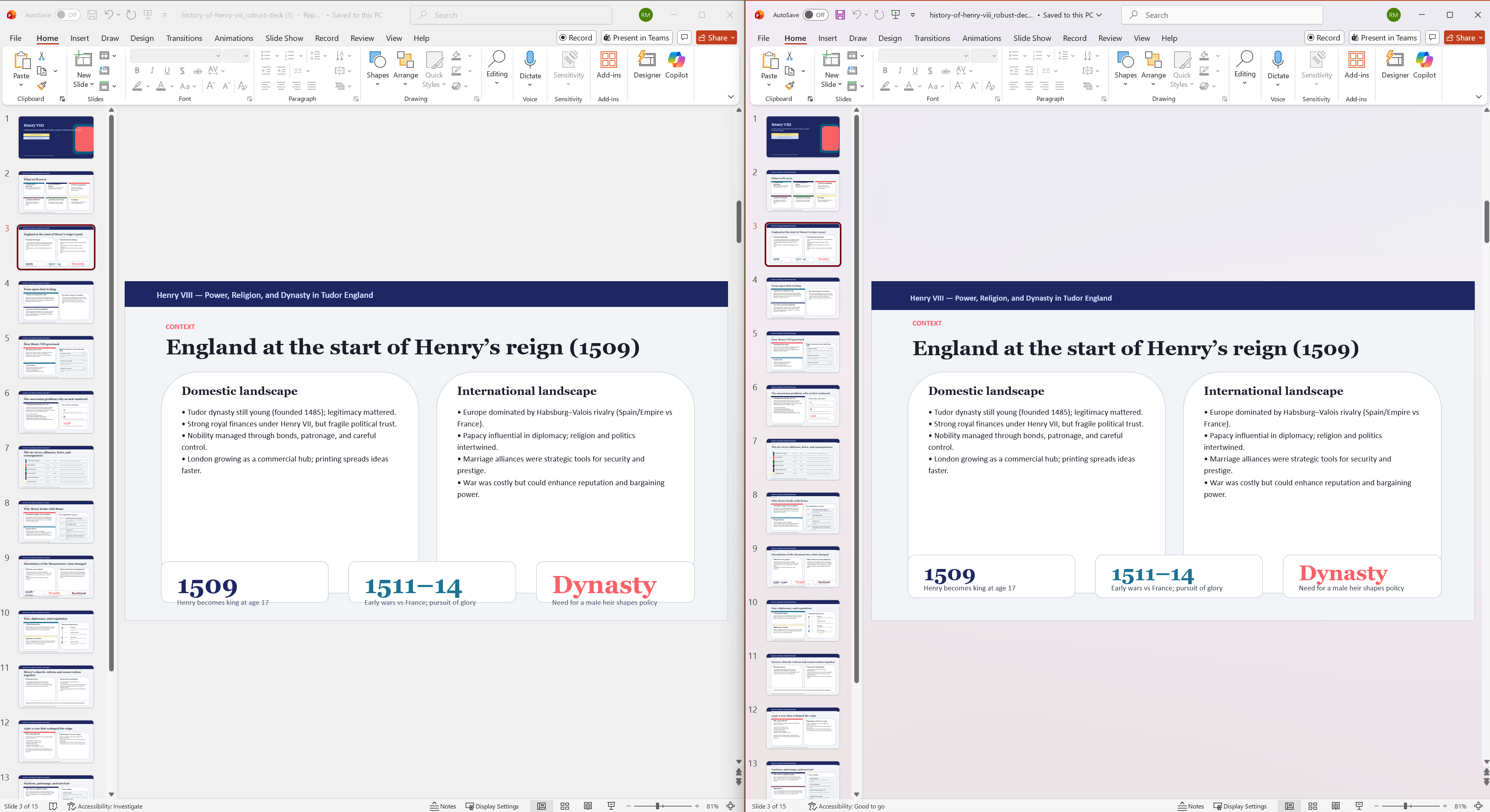
First draft: Text runs outside the safe zone → Corrected: Text resized and repositioned
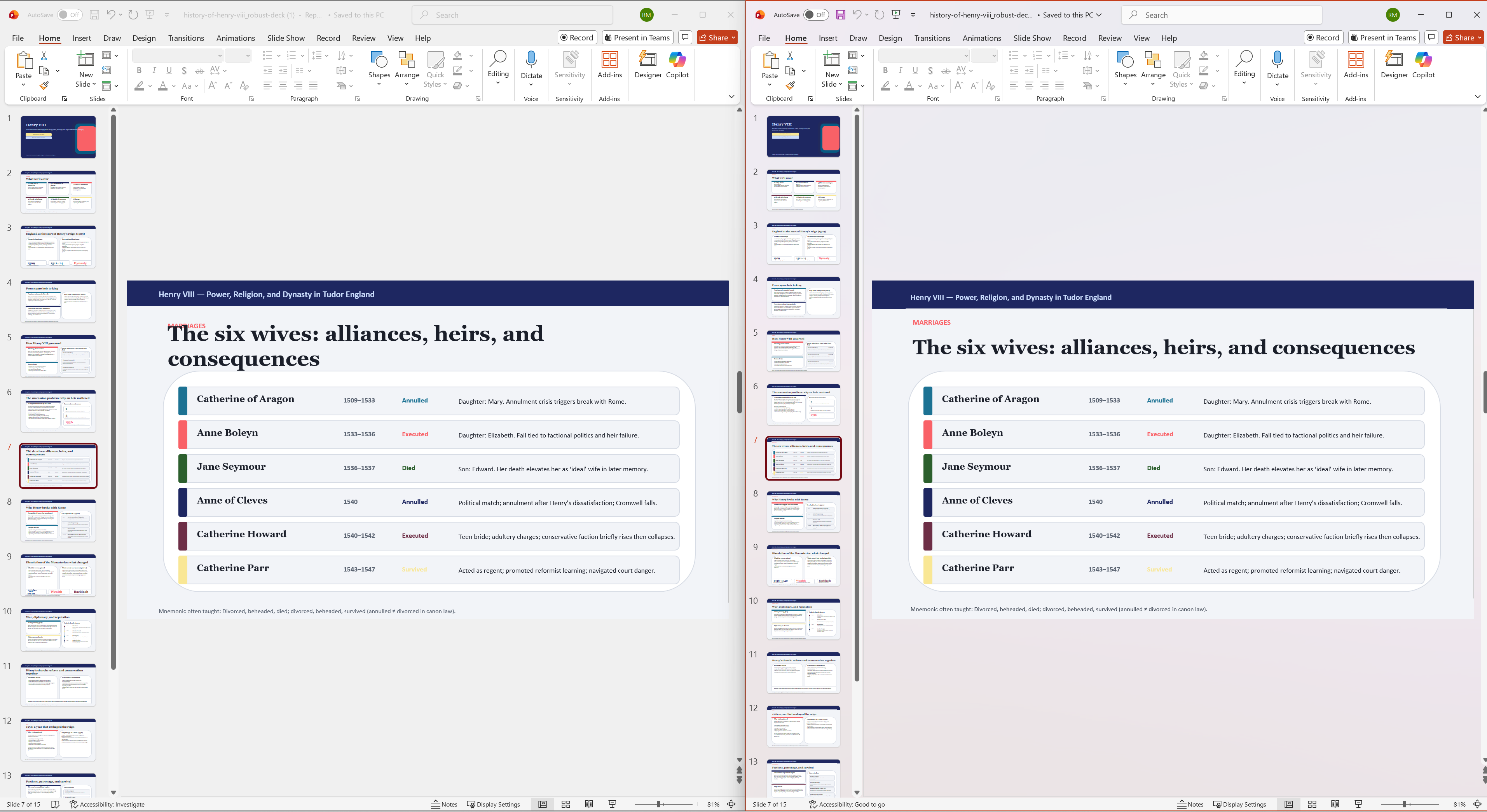
First draft: Uneven spacing throws off visual balance → Corrected: Proper alignment and spacing applied
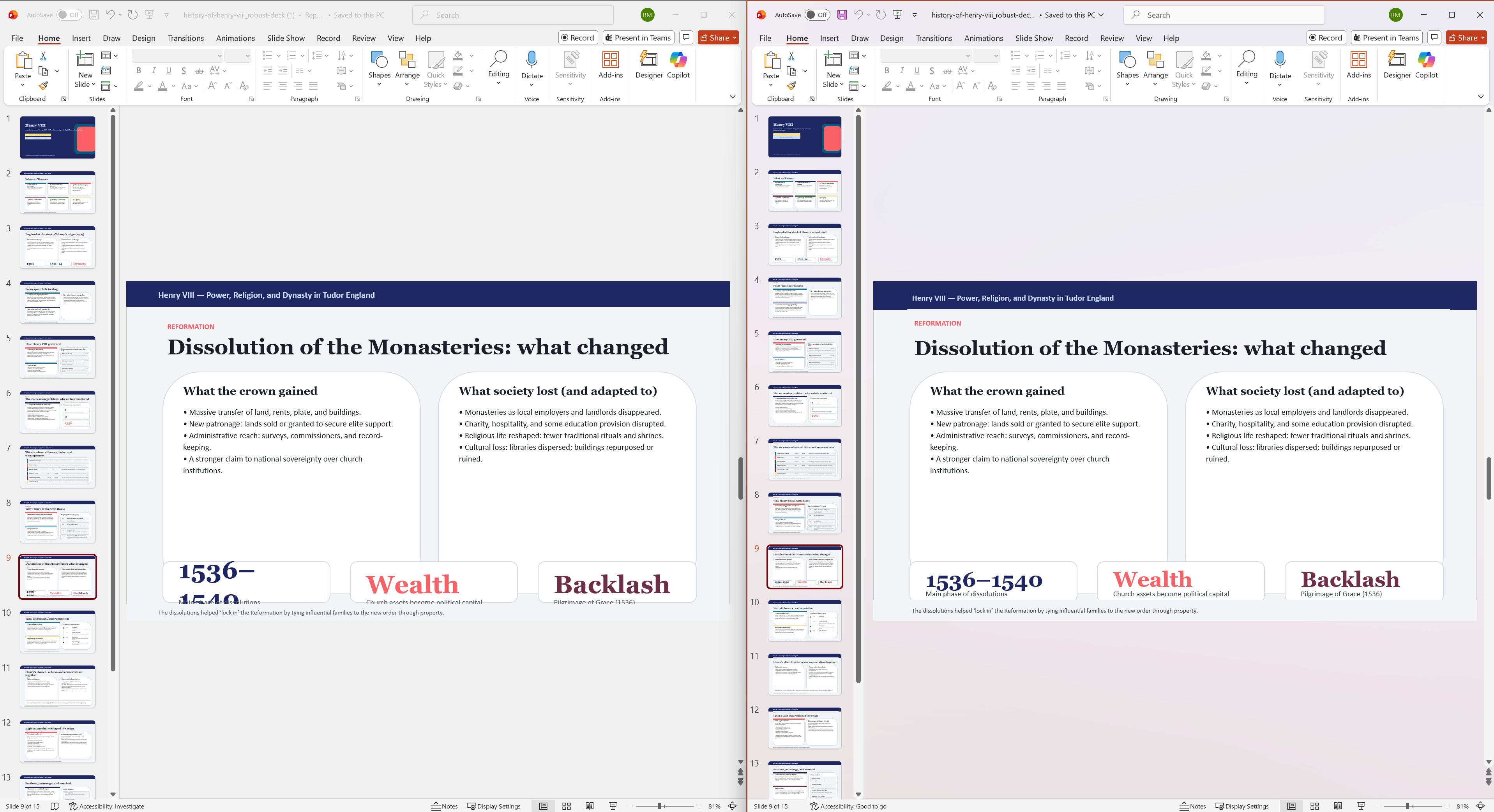
First draft: Bullet points overflow in multiple areas → Corrected: Font sizes and spacing optimized across all content zones
This feedback loop is the difference between "technically valid PowerPoint" and "this actually looks professional."
One thing I think is especially cool: the model we used for this in AuditionAI wasn't even an Anthropic model.
That said — Sonnet and Opus are still some of my favourite models when I want strong creative and design instincts. They're excellent when the goal is to build something beautiful.
What AuditionAI Actually Is
For those who don't know us well: AuditionAI is the interface and orchestration platform enterprises use to deliver GRC-first AI.
We're not a replacement for Anthropic or OpenAI models. We are the control layer between users and those models — the layer that helps enterprises govern, observe, and protect company data and intellectual property, regardless of which model is doing the work.
Related Reading
Who's Got Your Back?
When uninformed optimism meets informed pessimism — and why the gap between them is where expertise lives. A case study on what happens when expert guidance turns a stalling AI deployment into a 30% reduction in compliance requests.
AuditionAI
The comparison is real. And Document Forge is just days away from Customer Preview.
Keep an eye out for demonstrations for Word, Excel, PowerPoint — generated end-to-end, visual-review loop included, running entirely inside your cloud. Most of our video reveals happen on our LinkedIn.
How'd we do?
Genuinely would love your thoughts.
Like this content?
Subscribe to our weekly brief for more insights on AI engineering and enterprise platform development
Subscribe to Weekly BriefReady to See Document Forge in Action?
Let us show you how AuditionAI generates production-grade PowerPoint, Word, and Excel files — inside your cloud, governed by your rules.